OPCIS vs OPC EIEs
This topic compares the CygNet OPCIS with the CygNet OPC EIEs (OPC Comm EIE, OPC EIE, OPC Lufkin EIE, and OPC Weatherford EIE) to help you decide which OPC option best suits the requirements of your enterprise. See the following sections:
Introduction
Historically CygNet Software has supported data retrieval from external OPC servers with a dedicated current value service, the OPC Interface Service (OPCIS), which provides connectivity with local or remote OPC servers to transfer real-time data from remote devices into the CygNet system. The service is challenging to configure and operate, requiring a complex system of point and facility attribution in order to support OPC groups and polling.
Over time customers have requested a way to use OPC to retrieve dynagraph cards from remote devices, something the OPCIS does not support. This led to the development of the OPC EIE, which supports a way to organize related OPC items into a CygNet data group and represent dynagraph cards, and the OPC Comm EIE, which performs the actual communication with the OPC server. Both EIEs have been implemented within the standard CygNet EIE architectural framework following a familiar operational model.
Further advances in OPC server technology saw third-party providers such as Matrikon and TOP Server adding controller-specific enhancements in their servers. CygNet responded with the OPC Lufkin EIE and OPC Weatherford EIE, which are standard OPC EIEs with additional custom logic to collect surface and downhole dynagraph card data retrieved from controllers whose data is maintained by an enhanced OPC server. This device-independent functionality enables a user to view data directly in the data group editors or the CygNet Dynagraph Viewer application. A Dynagraph Card data group is used to view card details, like configurable stroke information and load/position pairs, which are used to construct a card plot. As with the OPC EIE, communication for these controller-specific EIEs is handled via the OPC Comm EIE.
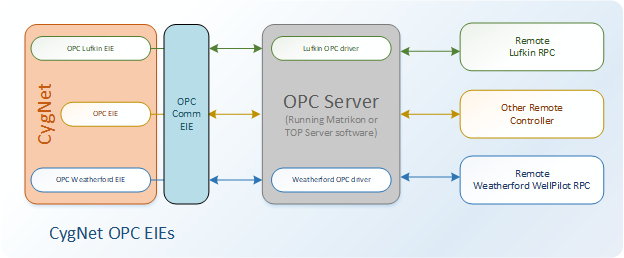
The following diagram shows how the OPC EIE, the OPC Lufkin EIE, and the OPC Weatherford EIE interface with the OPC Comm EIE, a third-party OPC server containing customer-specific OPC drivers, and the remote field devices.
|
| CygNet OPC EIEs |
Feature Comparison
The following table provides a feature-by-feature comparison of these technologies, showing how each feature is supported, configured, or handled by the OPCIS and the OPC EIEs.
| Item | CygNet OPCIS | CygNet OPC EIEs |
|---|---|---|
|
Configuration |
In the OPCIS, one OPC connection represents one OPC group. The default connection/group is defined via keywords the OPCIS service configuration file (Opcis.cfg). Additional connections/groups are optional and are defined using complex point and facility attribution. |
Configuration is done in the device editor via the standard CygNet EIE model for each remote device instance:
|
|
OPC Server Connection |
The default OPC server connection is configured via keywords in the Opcis.cfg file, including:
Additional server connections are supported via OPC group definitions in PNT tag attributes. Unique point attributes can be configured to override keyword values, including an attribute to override the OPC server name and OPC machine name for the OPC group. |
OPC server communication is configured in the OPC Comm EIE device instance, including the following properties:
Multiple connections to OPC servers are supported via multiple instances of the OPC Comm EIE. In the remote/comm EIE paradigm, the comm device represents a connection to a server that can be shared among many remote devices. A single connection to an OPC server can include many OPC groups across many remote devices. |
|
OPC Groups |
The default OPC group configuration is done via keywords in the Opcis.cfg file, including:
Additional OPC groups are supported, with each OPC group representing a connection to an OPC server. OPC group definition is encapsulated in a facility record. Unique point attributes can be configured in the PNT to override keyword values, including:
|
Supports multiple OPC groups representing a set of points that have a common polling/update frequency, are related by functionality, or are commonly viewed together. OPC group definitions include the following properties:
OPC group definition and management is very flexible, including:
|
|
OPC Server Type |
Supported by the OPCIS:
Colocation of the OPCIS and the OPC server on the same computer is recommended to alleviate potential network security and configuration issues. |
Supported by the OPC Comm EIE:
Colocation of CygNet and the OPC server is not required. |
|
Historical Data Retrieval |
Not supported |
Not supported |
|
Communication Type |
Both asynchronous and synchronous communication is supported. The OPCIS does not support asynchronous I/O. In this context, "asynchronous" indicates that only asynchronous callbacks are supported. OPCIS comm support:
|
Both asynchronous and synchronous communication is supported. Asynchronous callbacks are enabled based on an OPC group. Data group read requests can ask for data from the OPC cache (asynchronously) or from the remote device using either asynchronous or synchronous OPC calls. OPC EIEs comm support:
|
|
Dynagraph Cards |
Not supported |
Supported in the OPC Lufkin EIE and OPC Weatherford EIE, which are standard CygNet OPC EIEs with custom logic with respect to how dynagraph cards are handled and communicate with remote controllers whose data is maintained by an OPC server. These EIEs communicate with a third-party OPC server containing a manufacturer-specific interface to get dynagraph card data. Non-Lufkin or non-Weatherford remote devices can use the standard OPC EIE to get data. |
|
Failover |
Not supported, except via CygNet Redundancy at the service level |
Supported. Uses standard CygNet EIE and UIS failover to switch to a secondary or tertiary comm device if the primary comm line fails. |
|
Polling and Scheduling |
Writing a value to a specific point associated with an OPC group facility triggers one of these actions:
Another polling-related attribute that can be configured in the OPC group definition point to override a keyword value specifies whether the OPC server is to retrieve data from the OPC cache or the device. This applies to all synchronous communication. The MSS can be used to schedule a write to this OPC group definition point. |
Polling OPC data groups is accomplished via the standard EIE interface:
When requesting data for a data group, the user can choose to request data from the OPC cache or the physical device, and to use a synchronous or asynchronous polling method. |
|
Data Groups |
Not used |
A data group in CygNet represents a related set of items. One OPC group can consist of many CygNet data groups. A data group can be defined in the template file for use across many remote devices or configured uniquely for a specific remote device. The following types of OPC data groups are defined in the template file:
|
|
Quality Mapping |
Supports a method to map OPC quality values to point status bits in the PNT. |
Supports a method to map OPC quality values to point status bits in the PNT. Supports configurable point processing to handle unreliable values returned from an OPC server. To accommodate OPC servers that send sentinel values to indicate data quality, sentinels can be set on CygNet remote devices. |
|
Alarms and Notifications |
Supported via PNT, CAS, GNS |
Supported via PNT, CAS, GNS |
|
Security |
Supports special OPCIS events administered via the ACS, which must be added manually when the OPCIS is first configured. |
Supports standard CygNet DDS and UIS events for data group and UIS command operations. No special configuration is required. |
|
Point Capacity |
As a CygNet current-value service, the OPCIS supports up to 500,000 current-value data points from an OPC server. |
Interfaces with the UIS to store up to 500,000 current-value data points from an OPC server. |
|
64-bit Support |
Only 32-bit is available |
64-bit drivers and editors are available, which interface with 64-bit DDS and UIS. |
Summary
The OPCIS is a complex CygNet service to configure and operate, with a steep learning curve. Major limitations include the inability to organize related data within an OPC group, the inability to retrieve dynagraph cards, and the need to configure every point across the OPC server instead of relying on templated data that can be used across similarly configured remote devices.
In response CygNet Software has developed four OPC EIEs, which contain almost all functionality available in the OPCIS, plus support for data groups and dynagraph cards, using the standard CygNet EIE user interface. The OPC EIEs support custom OPC group configuration in the remote and comm devices, communication failover, and 64-bit drivers and editors, in a simpler, familiar configuration.


